
User Guide
Translations
Multi-locale copy in the flow editor with a translation workbench and AI auto-translate.
Purpose
Ship multiple locales so the SDK shows copy in each end user’s language. Manage locales and translated strings in the editor’s Translations workbench. Auto-translate fills missing strings using AI on Grow and Scale plans.
Open Translations mode
- Open a flow in the flow editor.
- Click Translations in the top bar (globe icon).
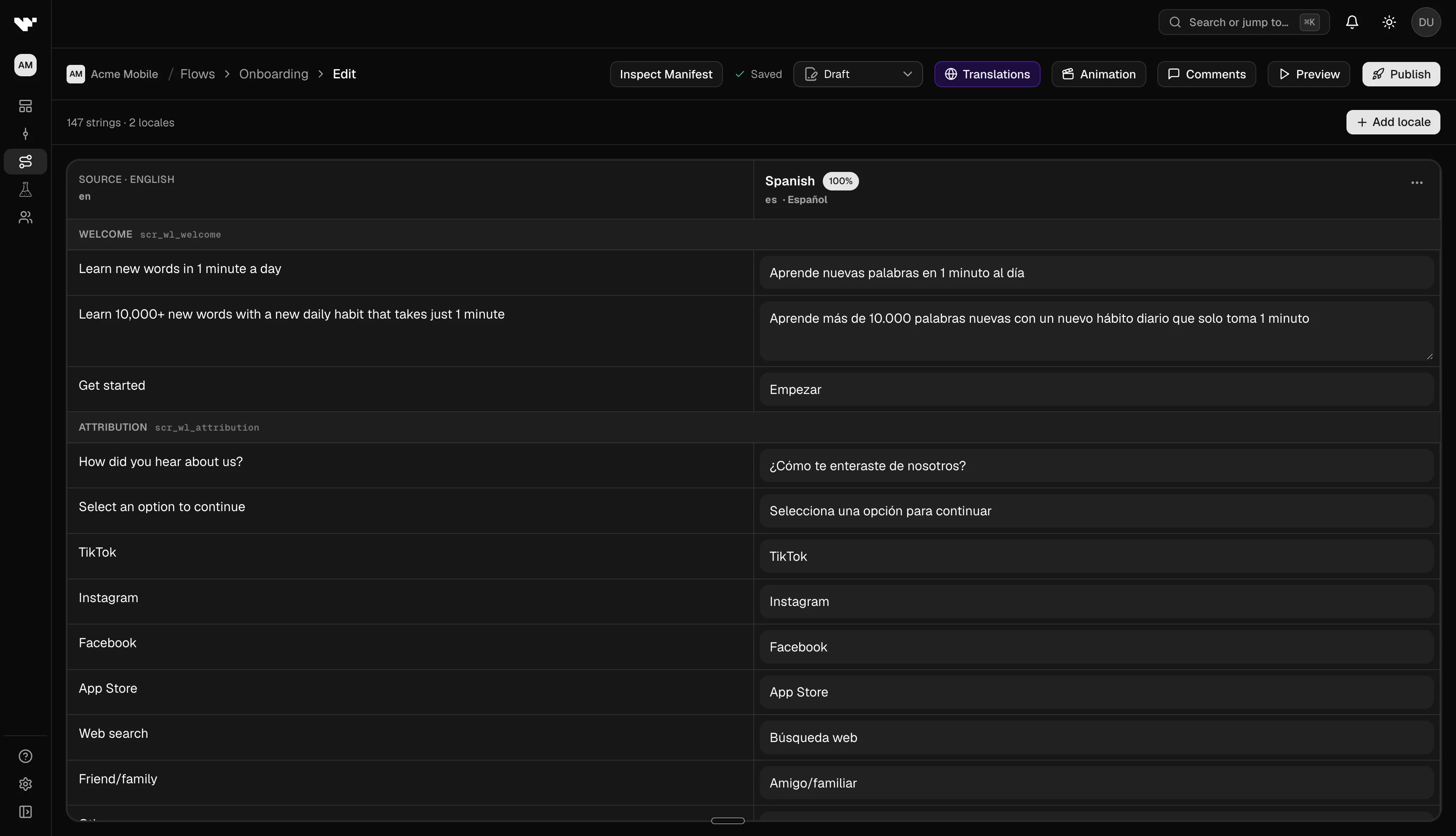
Manage locales and copy
- Review the table: rows are translatable strings grouped by screen; columns are locales.
- Add a locale with the add-locale control. Set the default locale in flow settings when needed.
- Edit cells directly for each locale, or run Auto-translate to fill empty cells from the default locale.
- Use Promote default locale to copy the default column into a target locale (Rheo asks you to confirm).
- Click Exit or Translations again to return to the canvas. Changes autosave with the draft.
Locale completion indicators show how many strings are filled per locale.
What gets translated
The workbench collects user-visible strings from your flow: layer text, button labels, choice options, and similar copy. Structural identifiers, field keys, and graph wiring are not translated.
At runtime, your app passes the user’s locale to Rheo. The SDK uses that locale together with the flow’s default locale and locales list from the published version.
Plan and permissions
- Indie plans cannot use translations in published flows (only the default locale is delivered to end users).
- Auto-translate requires Grow or Scale and AI enabled for your workspace.
- Members with edit access can change translations; viewers are read-only.
Troubleshooting
- Auto-translate disabled: Confirm the workspace is on Grow or Scale and AI is available for your role.
- App shows English only: Verify your app passes the user’s locale to Rheo and that locale exists in the published flow version.
- Missing strings after publish: Publish a new version after translation edits. Channels serve pinned versions, not live drafts.