
Experiments
Run A/B tests on onboarding flows, pick a primary metric, read the results, and ship a winner with confidence.
What experiments are for
An experiment splits traffic on a channel across two or more variants. Each variant is a published flow version. Rheo keeps each person on the same variant across sessions so results stay comparable.
Use experiments when copy, layout, branching, or monetization needs evidence instead of opinion.
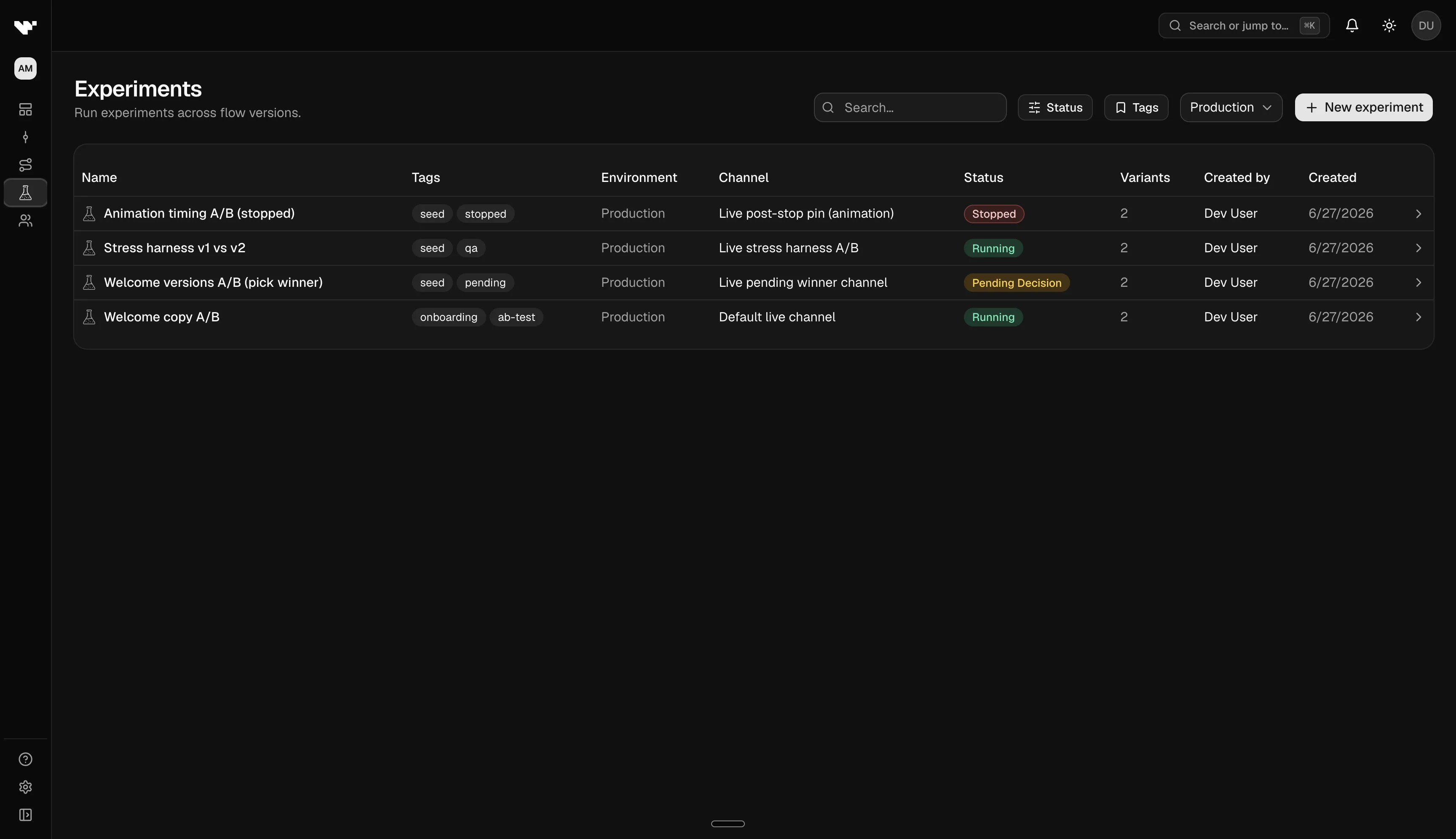
Experiment lifecycle
| Status | What it means |
|---|---|
| Draft | You are configuring variants, traffic split, primary metric, and end date. No users are bucketed yet. |
| Running | The channel serves variants according to your weights. Data accumulates in analytics. |
| Pending decision | The scheduled end time has passed. Users still see the same variants. Traffic does not stop. You must promote a winner or extend the experiment. |
| Stopped | The experiment is closed. The channel is pinned to the flow version you chose. |
Pending decision: what to do
When an experiment reaches pending decision, Rheo pauses the clock but does not yank users back to a single flow. Bucketing stays frozen so late events still land in the right arm.
You will get a notification. Open the experiment detail page and choose one of:
- Promote a winner: pick the variant (or another published version) that should become the channel's direct assignment going forward.
- Extend: push the end date out to gather more data. The experiment returns to Running with the same assignment.
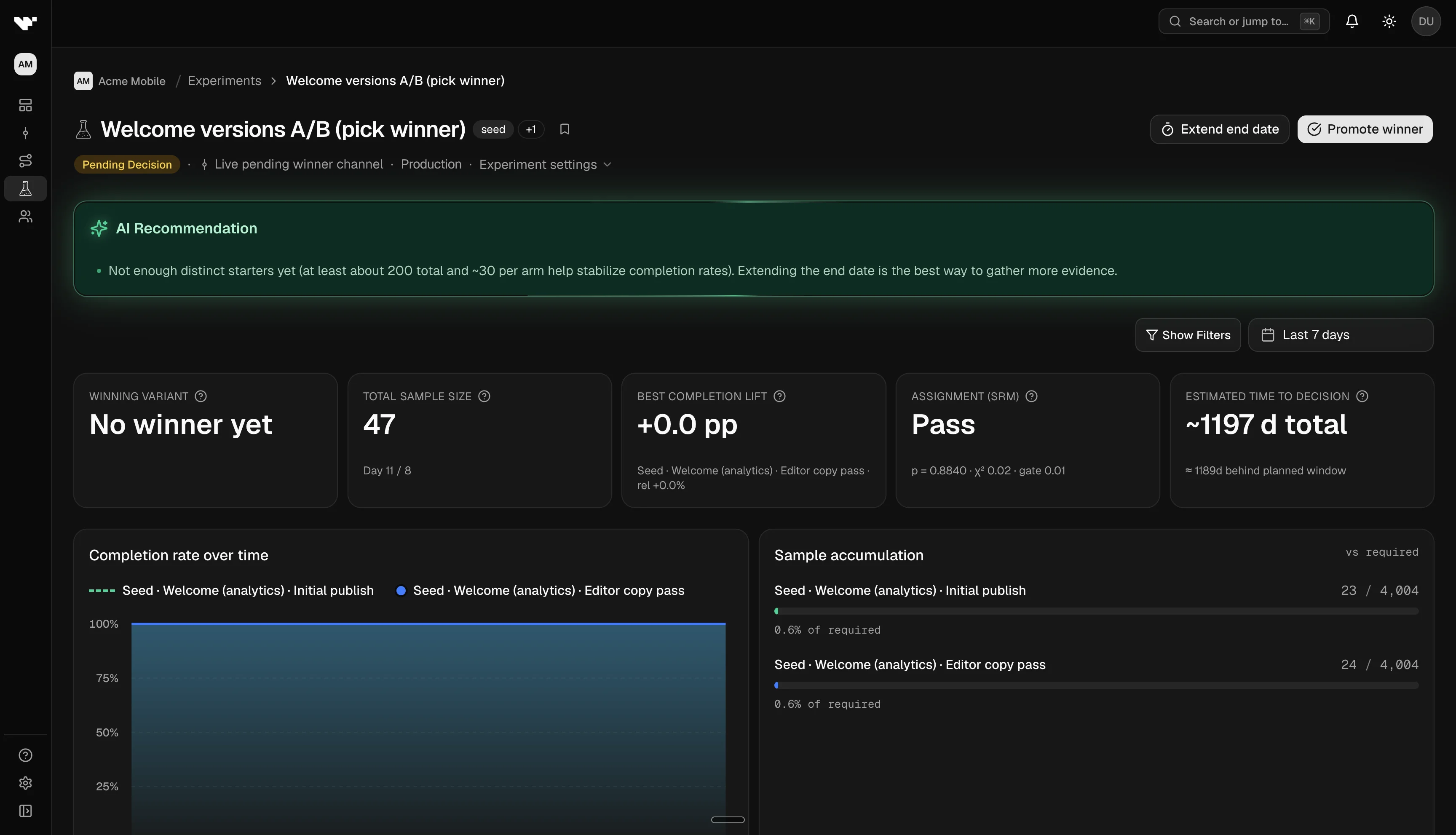
Rheo may show a data readout at pending decision: for example, suggesting you extend if too few people have started the flow, or highlighting a variant that beats the control on your primary metric. Treat this as guidance. Product judgment still matters.
Primary metric
Every experiment has a primary metric: the conversion Rheo uses for rates, lift, significance, and the winning-variant call. You set it while the experiment is in draft. It locks when the experiment starts so results stay comparable.
| Metric | What counts as success |
|---|---|
| Flow completion | Distinct users with a flow_completed event (default) |
| Paywall purchase | Distinct users with an iap_purchase event from a paywall integration in the flow |
| Custom event | Distinct users with the SDK event you pick (see scoping below) |
The denominator for rates is always distinct users who started the flow (flow_started). The numerator is the success event for your primary metric.
Custom events need a target
Many flows fire the same event on more than one screen or input. When you choose a custom event, Rheo asks you to pin where success happens:
| Custom event | What you must pick |
|---|---|
| Choice selected | The choice input (field key) that should count. Required when the flow has more than one choice layer. |
| Text submitted | The capture layer (field key) that should count — text, scale, wheel picker, date/time, number stepper, phone, address, and similar field-keyed inputs. Required when the flow has more than one capture layer. |
| Step viewed / completed / skipped, surface presented / outcome, decision evaluated, app review prompts, external link opened | The screen or surface (step id) that should count. |
Create the experiment with the event first if variants are not pinned yet. After you add variants with published flow versions, open the draft Primary metric card and pick the layer or step from those manifests. You cannot start the experiment until required targets are set.
Flow-level custom events that do not need a layer or step (for example flow_abandoned) only need the event name.
Winner logic
Rheo compares each treatment to the control (first variant) on the primary metric. A variant can be called the winner when:
- The difference vs control is statistically significant after a Bonferroni adjustment for multiple treatments.
- The lift confidence interval stays positive (treatment is better, not just different).
- Among arms that pass those checks, Rheo prefers the one with the highest relative lift.
If no arm clears the bar, the readout may suggest extending or keeping the control. You still choose what to promote.
Set up an experiment
- Publish each variant as its own flow version. Duplicating a baseline flow in the builder is the usual starting point.
- Draft the experiment on the channel you want to test. Choose a primary metric, add variant arms, set traffic weights, and pick a required end date (rounded to the top of the hour, UTC).
- Name variants in prose for your team if helpful. In the product, each arm is labeled automatically from the flow name and version (for example "Welcome v3"). Duplicate pins get a numeric suffix so lists stay unique.
- If the primary metric is a scoped custom event, pin variants first, then pick the input layer or screen / surface on the draft Primary metric card.
- Plan sample size while still in draft. See Experiment sample planning.
- Start when ready. Only Grow plans and above include experiments; concurrent experiment limits depend on your plan.
Keep a separate test channel on a direct pin if you want internal QA outside the split.
Read results on the dashboard
- The first variant in the list is the control. Lift, p-values, and "significant" badges for every other arm are pairwise comparisons vs that control on the primary metric.
- Column labels follow the metric (for example completion rate vs purchase rate vs a named custom event rate).
- If you run several treatment arms against one control, Rheo applies a Bonferroni adjustment so overall false-positive risk stays near the planned family rate. See Experiment sample planning.
- Sample ratio mismatch means actual traffic split does not match your configured weights. If Rheo flags this, verify assignment before trusting gaps between arms.
For population-level flow funnels and cohort charts, use Customers & analytics. For one person's journey, use Customers.
Extend or stop early
- Extend when you need more calendar time or traffic. Common at pending decision when sample size targets were not met.
- Stop early only with a documented reason (for example a broken variant or ethical/product constraint). Pick which published version the channel should serve afterward.
Plan limits
| Plan | Experiments |
|---|---|
| Indie | Not included |
| Grow | Up to 2 concurrent (draft + running + pending decision count toward the cap) |
| Scale | Up to 5 concurrent |
| Enterprise | Unlimited |
Troubleshooting
| Symptom | What to check |
|---|---|
| Uneven exposure between arms | Traffic weights, and whether another channel pin is bypassing the experiment |
| Missing metrics for a variant | SDK events and that the variant id appears in timelines |
| Custom metric shows zero success | The correct layer or step is selected, and that layer/step exists on every variant |
| Paywall purchase stays flat | The flow presents a paywall integration. RevenueCat and Superwall emit iap_purchase from the SDK. Stripe writes it only after the app webhook confirms checkout. |
| No clear winner | Widen the observation window via Extend rather than changing weights mid-flight |
Related
- Experiment sample planning
- Customers & analytics
- Channels & rollout
- Concept: Experiment
- Event catalog: SDK event names used as custom metrics